
You said:
Changing the subject on Shopify, we're going to create a form on our B2C website to provide B2B pricing.

RDX Sports
Couldn't load pickup availability
Perfect 👍 — what you want to do is create a form in your Shopify (B2C) store that allows certain users to request B2B access or pricing . It's a very common practice and can be easily implemented, even if you've changed your theme.
I'm going to explain the specific options and steps , and then I can generate the code ready to paste if you confirm your current theme or the name of the new one (for example, "Dawn", "Prestige", "Impulse", etc.).
Create a "B2B Price Request" form where the client:
Enter your details (name, company, email, phone, etc.)
Optionally, add your VAT number or tax identification number.
Send the request to your email or create a record in your Shopify customer dashboard
Shopify allows you to use its contact system with a custom form.
Steps:
In your dashboard, go to Online Store → Pages → Add page
Call the page, for example, “B2B Price Request”.
In the content editor, switch to the “Show HTML” tab (icon <> ) and paste code like this:
{% form 'contact', class: 'b2b-form' %}
 <h2>Solicitud de precios B2B</h2>
 <p>Rellena el siguiente formulario y nuestro equipo te contactará con condiciones especiales para empresas.</p>

 <label>Nombre completo</label>
 <input type="text" name="contact[full_name]" required>

 <label>Nombre de la empresa</label>
 <input type="text" name="contact[company]" required>

 <label>Correo electrónico</label>
 <input type="email" name="contact[email]" required>

 <label>Teléfono</label>
 <input type="tel" name="contact[phone]">

 <label>Número de IVA / CIF</label>
 <input type="text" name="contact[vat_number]">
<label>Message or query</label>
<textarea name="contact[body]" rows="5"></textarea>
<button type="submit" class="btn">Submit request</button>
{% endform %}
Save the page and publish it in the menu (for example, in the footer or in "Companies").
When someone submits the form, Shopify will send an email to your store's contact address (set in Settings → Store details → Contact email ).
If you want:
The form automatically creates a B2B customer in Shopify,
Or connect to a B2B or CRM app (for example, HubSpot or Klaviyo),
I can help you integrate that with a script or an external form (for example, with Shopify Flow , Shopify Forms , or Zapier ).
Send me this information and I'll give you the exact code adapted to your theme:
Which theme are you currently using? (e.g., Dawn , Sense , Prestige , etc.)
Do you want the form to only send an email or also automatically create a B2B customer in Shopify?
Do you want it on a separate page or embedded in a section of the homepage?
Do you want me to generate the exact code for your current theme right now?
Perfect! Let's get it ready to appear in your main menu (like "Sports Equipment" or "Blog / Information") at www.redgloveboxing.com
.
In the Shopify admin: Online Store → Pages → Add page .
Title: B2B Prices (the handle will be /pages/precios-b2b ).
Save the page as empty (without content yet).
Go to Online Store → Themes → Customize .
In the top bar, change the view to the page you just created ( B2B Pricing ).
In the left panel, Add section → Custom liquid .
Glue this block:
{% form 'contact', class: 'b2b-form max-w-xl mx-auto space-y-4' %}
 {% if form.posted_successfully? %}
 <div class="b2b-success" role="status" style="padding:12px;border:1px solid #c7f0c2;background:#f3fff1;border-radius:8px;">
 ¡Gracias! Hemos recibido tu solicitud y te contactaremos con las condiciones B2B.
 </div>
 {% endif %}

 {% if form.errors %}
<div class="b2b-errors" role="alert" style="padding:12px;border:1px solid #f5c2c7;background:#fff5f5;border-radius:8px;">
Check the marked fields and try again.
</div>
{% endif %}
<h1 style="margin:0 0 8px 0;">B2B Price Request</h1>
<p style="margin:0 0 16px 0;">Fill out the form and our team will activate the business terms for you.</p>
<div>
<label>Full Name*</label>
<input type="text" name="contact[full_name]" required style="width:100%;padding:10px;border:1px solid #ddd;border-radius:6px;">
</div>
<div>
<label>Company*</label>
<input type="text" name="contact[company]" required style="width:100%;padding:10px;border:1px solid #ddd;border-radius:6px;">
</div>
<div>
<label>Email address*</label>
<input type="email" name="contact[email]" required style="width:100%;padding:10px;border:1px solid #ddd;border-radius:6px;">
</div>
<div>
<label>Telephone</label>
<input type="tel" name="contact[phone]" style="width:100%;padding:10px;border:1px solid #ddd;border-radius:6px;">
</div>
<div>
<label>VAT / CIF</label>
<input type="text" name="contact[vat_number]" style="width:100%;padding:10px;border:1px solid #ddd;border-radius:6px;">
</div>
<div>
<label>Message</label>
<textarea name="contact[body]" rows="5" style="width:100%;padding:10px;border:1px solid #ddd;border-radius:6px;"></textarea>
</div>
<div style="display:flex;gap:8px;align-items:flex-start;">
<input type="checkbox" id="b2b-consent" required>
<label for="b2b-consent" style="font-size:14px;">I agree to be contacted regarding B2B terms and the <a href="/en/policies/privacy-policy" target="_blank" rel="noopener">privacy policy</a>.</label>
</div>
<input type="hidden" name="contact[subject]" value="B2B Request - RedGloveBoxing">
<button type="submit" style="padding:12px 18px;border:0;border-radius:8px;background:#111;color:#fff;cursor:pointer;">
Submit request
</button>
{% endform %}
This form uses Shopify's native system: you will receive an email at the store's contact address (check Settings → Store details → Contact email ).
Go to Online Store → Navigation → Main menu .
Add menu item .
Name : for example B2B Prices (or “Companies”).
Link : Pages → B2B Pricing .
Place it wherever you want:
As a main element (at the level of Sports Equipment ).
Or as a sub-element within Information / Blog : drag the item to the right under “Information” so that it hangs as a dropdown.
Guard.
(If you also want it in the footer, repeat in Footer menu .)
Short URL : When creating the page, make sure the handle is /pages/precios-b2b (easier for campaigns or links).
Confirmation in Spanish : the success and error messages are already included.
Internal tagging (optional) : If you then want to automate (Shopify Flow / Zapier) to create B2B clients and tag them , I can give you the flow ready so that, upon receiving the form, it creates the client with the b2b tag.
Would you also like me to add it as a submenu within "Information" and send you a mini-video/guide with step-by-step screenshots? I can also provide you with a basic workflow so that when you accept a company, a B2B price list is automatically assigned to it.
Perfect 💪 Don't worry — I'll explain it to you step by step as if we were doing it together inside Shopify , without using complicated code.
We're going to create the "B2B Prices" form and put it in the "Information" menu of your website www.redgloveboxing.com
.
Log in to your Shopify dashboard:
👉 https://www.shopify.com/admin
In the menu on the left, go to:
Online Store → Pages → Add page
In the Title field, type:
B2B Pricing
In the large text box (content), leave it empty for now or write something simple like:
Completa este formulario para solicitar acceso a nuestros precios B2B.
Click on Save at the top right.
On the same panel, go to:
Online Store → Themes → Customize
At the top, the view changes:
Click on the top bar where it says something like “Home page”.
Choose Pages → B2B Pricing (the page you created).
Now, on the left side panel:
Click on “Add section” .
Search for and select Custom Liquid (sometimes it appears as “Custom Liquid” or “Code Block”).
In the code field that appears, paste this entire form:
{% form 'contact', class: 'b2b-form max-w-xl mx-auto space-y-4' %}
 {% if form.posted_successfully? %}
 <div style="padding:12px;border:1px solid #c7f0c2;background:#f3fff1;border-radius:8px;">
 ✅ ¡Gracias! Hemos recibido tu solicitud y te contactaremos con las condiciones B2B.
 </div>
 {% endif %}

 <h1 style="margin:0 0 8px 0;">Solicitud de precios B2B</h1>
 <p>Rellena este formulario y nuestro equipo te contactará con tus condiciones personalizadas para empresas.</p>

 <label>Nombre completo*</label>
<input type="text" name="contact[full_name]" required style="width:100%;padding:10px;border:1px solid #ddd;border-radius:6px;">
<label>Company*</label>
<input type="text" name="contact[company]" required style="width:100%;padding:10px;border:1px solid #ddd;border-radius:6px;">
<label>Email address*</label>
<input type="email" name="contact[email]" required style="width:100%;padding:10px;border:1px solid #ddd;border-radius:6px;">
<label>Telephone</label>
<input type="tel" name="contact[phone]" style="width:100%;padding:10px;border:1px solid #ddd;border-radius:6px;">
<label>VAT / CIF</label>
<input type="text" name="contact[vat_number]" style="width:100%;padding:10px;border:1px solid #ddd;border-radius:6px;">
<label>Message</label>
<textarea name="contact[body]" rows="5" style="width:100%;padding:10px;border:1px solid #ddd;border-radius:6px;"></textarea>
<input type="hidden" name="contact[subject]" value="B2B Request - RedGloveBoxing">
<button type="submit" style="padding:12px 18px;border:0;border-radius:8px;background:#111;color:#fff;cursor:pointer;">
Submit request
</button>
{% endform %}
Click on Save at the top right.
✅ Your form is now working!
On the Shopify home screen, go to:
Online Store → Navigation
Click on Main menu .
Press Add menu item .
Fill in:
Name: Precios B2B
Link: Click on “Pages” and select your B2B Pricing page
To place it within Information , drag the new item a little to the right below “Information” (it will then become a submenu).
Click on Save menu .
On your website www.redgloveboxing.com
You will have:
📍 Menu → Information → B2B Prices
📝 A page with the form for companies.
📩 When someone sends it, you will receive an email at your store's contact address (set in Settings → Store details → Contact email ).
Would you like me to create a step-by-step visual guide with screenshots (images of the exact buttons in Shopify) so you don't have to search for anything?
I can prepare it for you in 2 minutes.
Perfect 🙌 I can clearly see your Shopify dashboard with the active theme (it looks like a copy of your main theme “ACTUA…”).
So you're in the right place — all you need to do is create the "B2B Pricing" page and add the form section .
I'll guide you step by step through what you're seeing on the screen right now:
Exit the editor (top left, click on the Shopify logo or on “← Online Store”).
In the left sidebar menu of the panel, go to:
Online Store → Pages → Add page .
Title it:
👉 B2B Prices
In the text box, you can put something simple like:
Completa este formulario para solicitar acceso a precios para distribuidores o clubes.
Click on Save (blue button at the top right).
Now go to:
Online Store → Themes → Customize .
At the top, you'll see that you're editing the "Home Page".
👉 Click there (on “Homepage”) and select:
Pages → B2B Pricing (or whatever name you gave the new page).
The view of that page (currently empty) will open.
In the left sidebar, click on “Add section” → search for and select “Custom Liquid” (or “Custom Liquid”, depending on your editor language).
In the block that appears, paste this code:
{% form 'contact', class: 'b2b-form max-w-xl mx-auto space-y-4' %}
 {% if form.posted_successfully? %}
 <div style="padding:12px;border:1px solid #c7f0c2;background:#f3fff1;border-radius:8px;">
 ✅ ¡Gracias! Hemos recibido tu solicitud y te contactaremos con las condiciones B2B.
 </div>
 {% endif %}
<h1>B2B Price Request</h1>
<p>Fill out this form and our team will contact you with your customized business terms.</p>
<label>Full Name*</label>
<input type="text" name="contact[full_name]" required style="width:100%;padding:10px;border:1px solid #ddd;border-radius:6px;">
<label>Company*</label>
<input type="text" name="contact[company]" required style="width:100%;padding:10px;border:1px solid #ddd;border-radius:6px;">
<label>Email address*</label>
<input type="email" name="contact[email]" required style="width:100%;padding:10px;border:1px solid #ddd;border-radius:6px;">
<label>Telephone</label>
<input type="tel" name="contact[phone]" style="width:100%;padding:10px;border:1px solid #ddd;border-radius:6px;">
<label>VAT / CIF</label>
<input type="text" name="contact[vat_number]" style="width:100%;padding:10px;border:1px solid #ddd;border-radius:6px;">
<label>Message</label>
<textarea name="contact[body]" rows="5" style="width:100%;padding:10px;border:1px solid #ddd;border-radius:6px;"></textarea>
<input type="hidden" name="contact[subject]" value="B2B Request - RedGloveBoxing">
<button type="submit" style="padding:12px 18px;border:0;border-radius:8px;background:#111;color:#fff;cursor:pointer;">
Submit request
</button>
{% endform %}
Click on Save at the top right.
✅ Done! Your form is now working.
On the main panel, go to:
Online Store → Navigation .
Click on Main menu .
Press Add menu item .
Name: Precios B2B
Link: Select “Pages” and then B2B Pricing
To place it within “Blog - Information” , drag the new item slightly to the right below that title (it will remain as a drop-down submenu).
Click on Save menu .
✅ Now, when visiting your website:
Menu → Blog - Information → B2B Pricing
You'll see your form working and you'll receive messages at the store's contact email address.
Would you like me to prepare a visual guide (with step-by-step images) that you can easily follow (PDF or mini video)?
That way you could replicate it without fear of touching anything.
Perfect 👌, thanks for the screenshot — that helps me a lot.
I see what's happening: the form appears "flat", without margins or formatting because the Liquid code is not receiving the theme styles ( your theme probably uses a grid system or custom classes that are not applied within a custom liquid block).
We'll make it look nice and aligned with your website's design , without touching the theme's code or breaking anything.
Below is a visually cleaner and more modern version of the form.
Follow these steps:
Go to Online Store → Themes → Customize
At the top, switch to the Sell Our Products - B2B page (the one you showed).
In the "Custom Liquid" block you already have, delete everything that came before and paste this new code:
<div style="max-width: 650px; margin: 0 auto; padding: 40px 20px; background: #fafafa; border-radius: 12px; box-shadow: 0 2px 8px rgba(0,0,0,0.05);">
 {% form 'contact', class: 'b2b-form' %}
 {% if form.posted_successfully? %}
 <div style="padding:15px; background:#e6f9e6; border:1px solid #a5e3a5; border-radius:8px; margin-bottom:20px;">
 ✅ ¡Gracias! Hemos recibido tu solicitud y te contactaremos pronto.
 </div>
 {% endif %}
 {% if form.errors %}
<div style="padding:15px; background:#ffecec; border:1px solid #f5c2c7; border-radius:8px; margin-bottom:20px;">
⚠️ Please check the marked fields and try again.
</div>
{% endif %}
<h2 style="text-align:center; font-weight:700; margin-bottom:20px;">B2B pricing request</h2>
<p style="text-align:center; margin-bottom:30px;">Fill out the form and our team will contact you with your customized business terms.</p>
<div style="display:grid; grid-template-columns:1fr 1fr; gap:16px;">
<div>
<label>Full Name*</label>
<input type="text" name="contact[full_name]" required style="width:100%; padding:10px; border:1px solid #ddd; border-radius:6px;">
</div>
<div>
<label>Company Name*</label>
<input type="text" name="contact[company]" required style="width:100%; padding:10px; border:1px solid #ddd; border-radius:6px;">
</div>
<div>
<label>Email address*</label>
<input type="email" name="contact[email]" required style="width:100%; padding:10px; border:1px solid #ddd; border-radius:6px;">
</div>
<div>
<label>Telephone</label>
<input type="tel" name="contact[phone]" style="width:100%; padding:10px; border:1px solid #ddd; border-radius:6px;">
</div>
<div style="grid-column:span 2;">
<label>VAT Number / Tax Identification Number</label>
<input type="text" name="contact[vat_number]" style="width:100%; padding:10px; border:1px solid #ddd; border-radius:6px;">
</div>
<div style="grid-column:span 2;">
<label>Message or query</label>
<textarea name="contact[body]" rows="5" style="width:100%; padding:10px; border:1px solid #ddd; border-radius:6px;"></textarea>
</div>
</div>
<input type="hidden" name="contact[subject]" value="B2B Request - RedGloveBoxing">
<div style="text-align:center; margin-top:30px;">
<button type="submit" style="background:#111; color:#fff; padding:14px 40px; border:0; border-radius:8px; font-weight:600; cursor:pointer;">
Submit request
</button>
</div>
{% endform %}
</div>
Save (click the “Save” button at the top right).
The form is centered and has a light background , like a card.
Fields in two columns (responsive, adapts automatically to mobile).
Black button with a Shopify-style design.
Messages of success or failure with soft and modern colors.
Do you want the button and colors to use the same corporate Redglove red instead of black?
I can give you the exact visual variant (with your shade of red and adapted typography). Just tell me:
👉 Do you want the button to be red with white text to match the logo?
I see it! 👀
Your screenshot literally shows things like {% form 'contact' %} and {% endif %} . This happens when Liquid code is pasted into a section that Liquid doesn't interpret (for example, "Rich text" or within the page content). That's why "strange things appear."
We'll fix it in 2 minutes:
Go to Online Store → Themes → Customize and open the Sell our products - B2B page.
In the left column:
Remove the block/section where you see the text {% form ... %} (it's probably "Rich Text").
Click Add section → choose “Custom liquid” (or “Custom liquid”).
If it doesn't appear, using "Custom HTML / Custom HTML" won't work ; it has to be Custom Liquid .
In that new section, paste this code (updated and clean):
<div style="max-width:650px;margin:0 auto;padding:40px 20px;background:#fafafa;border-radius:12px;box-shadow:0 2px 8px rgba(0,0,0,0.05);">
  {% form 'contact', class: 'b2b-form' %}
    {% if form.posted_successfully? %}
      <div style="padding:15px;background:#e6f9e6;border:1px solid #a5e3a5;border-radius:8px;margin-bottom:20px;">
        ✅ ¡Gracias! Hemos recibido tu solicitud y te contactaremos pronto.
      </div>
    {% endif %}
    {% if form.errors %}
      <div style="padding:15px;background:#ffecec;border:1px solid #f5c2c7;border-radius:8px;margin-bottom:20px;">
        ⚠️ Por favor revisa los campos marcados e inténtalo de nuevo.
      </div>
    {% endif %}

<h2 style="text-align:center;font-weight:700;margin-bottom:20px;">B2B pricing request</h2>
 <p style="text-align:center;margin-bottom:30px;">Fill out the form and our team will contact you with customized terms for businesses.</p>

 <div style="display:grid;grid-template-columns:1fr 1fr;gap:16px;">
 <div>
 <label>Full Name*</label>
 <input type="text" name="contact[full_name]" required style="width:100%;padding:10px;border:1px solid #ddd;border-radius:6px;">
 </div>
 <div>
 <label>Company Name*</label>
 <input type="text" name="contact[company]" required style="width:100%;padding:10px;border:1px solid #ddd;border-radius:6px;">
 </div>
 <div>
 <label>Email address*</label>
 <input type="email" name="contact[email]" required style="width:100%;padding:10px;border:1px solid #ddd;border-radius:6px;">
</div>
 <div>
 <label>Telephone</label>
 <input type="tel" name="contact[phone]" style="width:100%;padding:10px;border:1px solid #ddd;border-radius:6px;">
 </div>
 <div style="grid-column:span 2;">
 <label>VAT Number / Tax Identification Number</label>
 <input type="text" name="contact[vat_number]" style="width:100%;padding:10px;border:1px solid #ddd;border-radius:6px;">
 </div>
 <div style="grid-column:span 2;">
 <label>Message or query</label>
 <textarea name="contact[body]" rows="5" style="width:100%;padding:10px;border:1px solid #ddd;border-radius:6px;"></textarea>
 </div>
 </div>

 <input type="hidden" name="contact[subject]" value="B2B Request - RedGloveBoxing">

 <div style="text-align:center;margin-top:30px;">
<button type="submit" style="background:#111;color:#fff;padding:14px 40px;border:0;border-radius:8px;font-weight:600;cursor:pointer;">
 Submit request
 </button>
 </div>
 {% endform %}
 </div>
Save . Refreshes your eyes.
— You shouldn't see tags {% ... %} or "weird stuff" anymore.
Some themes include a "Contact form" section that already applies the theme's style:
Add a section → Contact form on that page.
Title: “B2B Price Request”.
You won't be able to add as many extra fields, but it will be 100% visually integrated.
Do you want the button in your corporate red ? Change background:#111; to background:#d61518; (or the exact value of your red).
To prevent the form from appearing too "tall" on the page, add a header or a full-width image of 1200–1600px at the top for balance.
If Liquid still appears as text after following these steps, please tell me the exact name you see in the section where you pasted it (e.g., “Rich Text”, “Custom HTML”, “Custom Liquid”). This will allow me to tell you which block to remove and which to use.
Perfect 💥 — very good idea.
If the goal of the page is to attract stores, gyms, or distributors to join the B2B program, then we'll give it a more commercial and professional design , with images, a strong slogan like "Increase your profit with Redglove Boxing!" and the form at the end.
I'm leaving you with a ready-to-use, visually polished version that you can copy as is into your "Custom Liquid" section or, if you prefer, divide into several sections (image, text, and form).
1️⃣ Banner with large image and motivational text
2️⃣ Text block with benefits for distributors
3️⃣ B2B contact form (the one you already have, improved)
In the Shopify visual editor ( Customize ) on your “Sell our products” page:
Click “Add section” → “Image banner” .
Recommended image:
A professional boxer-type photo in a gym, with Redglove products or a black background.
(You can temporarily use one of your own images from the main slider).
Header text:
Increase your profits by selling Redglove Boxing!
Secondary text:
Join our B2B program for shops, clubs, and gyms. Get exclusive pricing, direct support, and professional materials.
Button:
Text: Request B2B access
Link: #form-b2b (to scroll to the form).
Save ✅
Add a "Multicolumn" section (if your theme has one).
Complete with three columns of the following type:
| Icon | Qualification | Description |
|---|---|---|
| 🥊 | Professional equipment | Gloves, bandages, bags and rings made by experts for boxing and contact sports. |
| 💰 | Volume discounts | Better margins for distributors and affiliated gyms. |
| 🚚 | Fast delivery and support | Shipping from Spain and personalized service for your business. |
Save ✅
Add a "Custom Liquid" section at the end and paste this code:
<div id="form-b2b" style="max-width:700px;margin:60px auto;padding:40px 20px;background:#fafafa;border-radius:12px;box-shadow:0 4px 12px rgba(0,0,0,0.08);">
  {% form 'contact', class: 'b2b-form' %}
    {% if form.posted_successfully? %}
      <div style="padding:15px;background:#e6f9e6;border:1px solid #a5e3a5;border-radius:8px;margin-bottom:20px;">
        ✅ ¡Gracias! Hemos recibido tu solicitud y te contactaremos pronto.
      </div>
    {% endif %}
    {% if form.errors %}
      <div style="padding:15px;background:#ffecec;border:1px solid #f5c2c7;border-radius:8px;margin-bottom:20px;">
        ⚠️ Por favor revisa los campos marcados e inténtalo de nuevo.
      </div>
    {% endif %}

<h2 style="text-align:center;font-weight:700;margin-bottom:20px;">Request your B2B access</h2>
 <p style="text-align:center;margin-bottom:30px;">Fill out the form and discover how Redglove can boost your business.</p>

 <div style="display:grid;grid-template-columns:1fr 1fr;gap:16px;">
 <div>
 <label>Full Name*</label>
 <input type="text" name="contact[full_name]" required style="width:100%;padding:10px;border:1px solid #ddd;border-radius:6px;">
 </div>
 <div>
 <label>Company Name*</label>
 <input type="text" name="contact[company]" required style="width:100%;padding:10px;border:1px solid #ddd;border-radius:6px;">
 </div>
 <div>
 <label>Email address*</label>
 <input type="email" name="contact[email]" required style="width:100%;padding:10px;border:1px solid #ddd;border-radius:6px;">
 </div>
<div>
 <label>Telephone</label>
 <input type="tel" name="contact[phone]" style="width:100%;padding:10px;border:1px solid #ddd;border-radius:6px;">
 </div>
 <div style="grid-column:span 2;">
 <label>VAT Number / Tax Identification Number</label>
 <input type="text" name="contact[vat_number]" style="width:100%;padding:10px;border:1px solid #ddd;border-radius:6px;">
 </div>
 <div style="grid-column:span 2;">
 <label>Message or query</label>
 <textarea name="contact[body]" rows="5" style="width:100%;padding:10px;border:1px solid #ddd;border-radius:6px;"></textarea>
 </div>
 </div>

 <input type="hidden" name="contact[subject]" value="B2B Request - RedgloveBoxing">

 <div style="text-align:center;margin-top:30px;">
<button type="submit" style="background:#d61518;color:#fff;padding:14px 40px;border:0;border-radius:8px;font-weight:600;cursor:pointer;">
 Submit request
 </button>
 </div>
 {% endform %}
 </div>
Save ✅
Shocking image above (“Increase your profit by selling Redglove Boxing”)
Clear benefits in 3 columns
Professional form centered with corporate red button.
Would you like me to recommend free (royalty-free) images that match your brand style — for example, black background, boxers and red gloves — for that banner?
I can send you 3 links ready to upload to the topic.
Perfect 👌 — adding a short introduction at the top , before the form (or just below the banner), will make the page look much more professional and trustworthy.
Here's an introductory text that fits your Redglove Boxing brand style, designed to motivate clubs, gyms, and shops to join your B2B network 👇
Are you a store, gym, or distributor?
At Redglove Boxing, we have been equipping athletes and professionals in boxing, Muay Thai, and MMA with quality equipment manufactured directly by us since 2015.
If you have a business related to contact sports, you can access exclusive distributor rates , preferential conditions, and personalized support.
Increase your profits by offering the leading Spanish brand in professional boxing equipment!
You have two options depending on your visual preference:
Add a rich text section just below the banner (or above the form).
Paste the text above there and center it .
You can highlight words like “exclusive rates” or “leading Spanish brand” in bold .
If you prefer to have it integrated within the Liquid personalizado block, you can add this snippet before the form , like this:
<div style="max-width:800px;margin:40px auto;text-align:center;">
 <h2 style="font-size:28px;margin-bottom:10px;">¿Eres tienda, gimnasio o distribuidor?</h2>
 <p style="font-size:17px;line-height:1.6;color:#444;">
 En <strong>Redglove Boxing</strong> llevamos desde 2015 equipando a deportistas y profesionales del boxeo, Muay Thai y MMA con material de calidad fabricado directamente por nosotros.
 <br><br>
If you have a business related to contact sports, you can access <strong>exclusive distributor rates</strong>, preferential conditions and personalized support.
<br><br>
<strong>Increase your profits by offering the leading Spanish brand in professional boxing equipment!</strong>
</p>
</div>
(You can paste this right before the B2B form block within the same “Custom Liquid”.)
Do you want me to combine everything (banner, introduction and form) into a single code structure ready to paste so that it is already laid out and centered with your colors (red #d61518)?
This way you wouldn't have to add multiple sections manually.
Perfect 🔥 — you want the B2B page to clearly reflect your identity as Redglove Boxing / RDX Spain , with an introduction that conveys professionalism, trust, and business opportunity .
Here's a complete, ready-to-use version (banner, introduction, and form) that you can paste directly into a "Custom Liquid" section within your "Sell Our Products - B2B" page.
It's designed to look clean, modern, and 100% aligned with your brand.
<!-- 🔴 REDGLOVE BOXING / RDX ESPAÑA - Página B2B -->
 <section style="max-width:1200px;margin:0 auto;padding:40px 20px;text-align:center;">

 <!-- 🥊 Banner principal -->
<div style="background:url('https://cdn.shopify.com/s/files/1/XXXXXX/files/banner-b2b-redglove.jpg?v=1') center/cover no-repeat;border-radius:12px;padding:80px 20px;color:#fff;box-shadow:0 4px 12px rgba(0,0,0,0.3);">
<h1 style="font-size:36px;font-weight:700;margin-bottom:10px;">Increase your profits by selling Redglove Boxing!</h1>
<p style="font-size:18px;max-width:700px;margin:0 auto;">
Become an official distributor of <strong>Redglove Boxing / RDX Spain</strong> and offer your customers professional boxing, Muay Thai and MMA equipment of superior quality.
</p>
</div>
<!-- 🥇 Introduction -->
<div style="max-width:850px;margin:60px auto 30px;">
<h2 style="font-size:26px;margin-bottom:10px;">Are you a shop, gym, or distributor?</h2>
<p style="font-size:17px;line-height:1.7;color:#333;">
Since 2015, at <strong>Redglove Boxing</strong> we have been working to offer the best sports equipment for practicing Boxing, Muay Thai and MMA.
As a representative of <strong>RDX Spain</strong>, we give you access to <strong>exclusive B2B pricing</strong>, volume discounts, and direct support from our team in Spain.
<br><br>
If you manage a gym, sports shop, or martial arts club, join our network of professionals and <strong>increase your profitability with top-quality products.</strong>
</p>
</div>
<!-- 💰 Benefits -->
<div style="display:grid;grid-template-columns:repeat(auto-fit,minmax(250px,1fr));gap:20px;margin:40px auto;max-width:900px;">
<div style="background:#fafafa;padding:25px;border-radius:10px;box-shadow:0 2px 8px rgba(0,0,0,0.05);">
<h3 style="color:#d61518;margin-bottom:10px;">🥊 Professional material</h3>
<p>Gloves, bandages, punching bags, flooring, and ring designed and manufactured with materials of maximum durability.</p>
</div>
<div style="background:#fafafa;padding:25px;border-radius:10px;box-shadow:0 2px 8px rgba(0,0,0,0.05);">
<h3 style="color:#d61518;margin-bottom:10px;">💰 Prices for distributors</h3>
<p>Access special margins, volume discounts, and exclusive benefits for businesses and gyms.</p>
</div>
<div style="background:#fafafa;padding:25px;border-radius:10px;box-shadow:0 2px 8px rgba(0,0,0,0.05);">
<h3 style="color:#d61518;margin-bottom:10px;">🚚 Fast shipping and support</h3>
<p>Personalized service from Spain and express deliveries throughout the country and Europe.</p>
</div>
</div>
<!-- 📩 Form -->
<div id="form-b2b" style="max-width:700px;margin:60px auto;padding:40px 20px;background:#fafafa;border-radius:12px;box-shadow:0 4px 12px rgba(0,0,0,0.08);">
{% form 'contact', class: 'b2b-form' %}
{% if form.posted_successfully? %}
<div style="padding:15px;background:#e6f9e6;border:1px solid #a5e3a5;border-radius:8px;margin-bottom:20px;">
✅ Thank you! We have received your request and will contact you soon.
</div>
{% endif %}
{% if form.errors %}
<div style="padding:15px;background:#ffecec;border:1px solid #f5c2c7;border-radius:8px;margin-bottom:20px;">
⚠️ Please check the marked fields and try again.
</div>
{% endif %}
<h2 style="text-align:center;font-weight:700;margin-bottom:20px;">Request your B2B access</h2>
<p style="text-align:center;margin-bottom:30px;">Fill out the form and discover how <strong>Redglove Boxing / RDX Spain</strong> can boost your business.</p>
<div style="display:grid;grid-template-columns:1fr 1fr;gap:16px;">
<div>
<label>Full Name*</label>
<input type="text" name="contact[full_name]" required style="width:100%;padding:10px;border:1px solid #ddd;border-radius:6px;">
</div>
<div>
<label>Company Name*</label>
<input type="text" name="contact[company]" required style="width:100%;padding:10px;border:1px solid #ddd;border-radius:6px;">
</div>
<div>
<label>Email address*</label>
<input type="email" name="contact[email]" required style="width:100%;padding:10px;border:1px solid #ddd;border-radius:6px;">
</div>
<div>
<label>Telephone</label>
<input type="tel" name="contact[phone]" style="width:100%;padding:10px;border:1px solid #ddd;border-radius:6px;">
</div>
<div style="grid-column:span 2;">
<label>VAT Number / Tax Identification Number</label>
<input type="text" name="contact[vat_number]" style="width:100%;padding:10px;border:1px solid #ddd;border-radius:6px;">
</div>
<div style="grid-column:span 2;">
<label>Message or query</label>
<textarea name="contact[body]" rows="5" style="width:100%;padding:10px;border:1px solid #ddd;border-radius:6px;"></textarea>
</div>
</div>
<input type="hidden" name="contact[subject]" value="B2B Request - RedgloveBoxing / RDX Spain">
<div style="text-align:center;margin-top:30px;">
<button type="submit" style="background:#d61518;color:#fff;padding:14px 40px;border:0;border-radius:8px;font-weight:600;cursor:pointer;">
Submit request
</button>
</div>
{% endform %}
</div>
</section>
Use an image with a dark background and red accents (to match your logo).
Examples you can use for free:
Just upload it to Files → Shopify Files and replace the URL in the code:
https: // cdn.shopify.com/ s/files/1/ XXXXXX/files/banner-b2b-redglove.jpg?v= 1
using the actual URL that Shopify gives you when you upload your image.
Would you like me to give this page a black background like Redglove (instead of light gray) to match the rest of the site?
I can adapt the colors to a professional dark style with red and white accents.
It's going very well! 💪
In your screenshot, I see that Liquid lines are still appearing as text ( {% form 'contact' ... %} , {% endif %} ) right above the form. This happens because there's another "Rich text" block with the code pasted inside. There should only be one "Custom Liquid" block with EVERYTHING inside.
In the Customize section of that page:
In the left sidebar, find the block/section that displays those lines {% form ... %} and delete it (it is usually “Rich text” or “Rich text”).
Leave only the “Custom Liquid” section.
Open that custom Liquid section and replace its contents with this unique code (clean and organized):
<section style="max-width:1100px;margin:0 auto;padding:24px 20px;">
 <!-- Intro + beneficios (lo que ya tienes, pero dentro del mismo bloque) -->
 <div style="max-width:820px;margin:0 auto 28px;text-align:center;">
 <h2 style="font-size:28px;margin:0 0 8px;">¿Eres tienda, gimnasio o distribuidor?</h2>
 <p style="font-size:17px;line-height:1.7;color:#444;margin:0;">
 Conviértete en distribuidor oficial de <strong>Redglove Boxing / RDX España</strong> y ofrece a tus clientes material profesional
Boxing, Muay Thai, and MMA of superior quality. <strong>Increase your profits!</strong>
</p>
</div>
<div style="display:grid;grid-template-columns:repeat(auto-fit,minmax(240px,1fr));gap:16px;max-width:900px;margin:0 auto 26px;">
<div style="background:#fafafa;padding:18px;border-radius:10px;box-shadow:0 1px 6px rgba(0,0,0,0.05);">
<h3 style="margin:0 0 6px;color:#d61518;">🥊 Professional material</h3>
<p style="margin:0;color:#555;">Gloves, bandages, bags, flooring and ring made with highly durable materials.</p>
</div>
<div style="background:#fafafa;padding:18px;border-radius:10px;box-shadow:0 1px 6px rgba(0,0,0,0.05);">
<h3 style="margin:0 0 6px;color:#d61518;">💰 Prices for distributors</h3>
<p style="margin:0;color:#555;">Special margins and volume discounts for B2B.</p>
</div>
<div style="background:#fafafa;padding:18px;border-radius:10px;box-shadow:0 1px 6px rgba(0,0,0,0.05);">
<h3 style="margin:0 0 6px;color:#d61518;">🚚 Fast shipping and support</h3>
<p style="margin:0;color:#555;">Customer service from Spain and express deliveries in Spain and Europe.</p>
</div>
</div>
<!-- Small gallery (optional) -->
<div style="display:flex;gap:8px;justify-content:center;flex-wrap:wrap;margin:0 auto 24px;max-width:820px;">
<!-- Replace src with your photos -->
<img src="https://via.placeholder.com/220x140" alt="Product 1" style="width:220px;height:140px;object-fit:cover;border-radius:8px;">
<img src="https://via.placeholder.com/220x140" alt="Product 2" style="width:220px;height:140px;object-fit:cover;border-radius:8px;">
<img src="https://via.placeholder.com/220x140" alt="Product 3" style="width:220px;height:140px;object-fit:cover;border-radius:8px;">
</div>
<!-- Form -->
<div id="form-b2b" style="max-width:700px;margin:0 auto 40px;padding:28px 20px;background:#fff;border:1px solid #eee;border-radius:12px;box-shadow:0 2px 10px rgba(0,0,0,0.06);">
{% form 'contact', class: 'b2b-form' %}
{% if form.posted_successfully? %}
<div style="padding:12px;background:#e6f9e6;border:1px solid #a5e3a5;border-radius:8px;margin-bottom:14px;">✅ Thank you! We will contact you soon.</div>
{% endif %}
{% if form.errors %}
<div style="padding:12px;background:#ffecec;border:1px solid #f5c2c7;border-radius:8px;margin-bottom:14px;">⚠️ Check the fields and try again.</div>
{% endif %}
<h3 style="text-align:center;margin:0 0 6px;">Request your B2B access</h3>
<p style="text-align:center;margin:0 0 18px;color:#666;">RDX ESPAÑA and REDGLOVE BOXING</p>
<div style="display:grid;grid-template-columns:1fr 1fr;gap:12px;">
<div>
<label>Full Name*</label>
<input type="text" name="contact[full_name]" required style="width:100%;padding:10px;border:1px solid #ddd;border-radius:6px;">
</div>
<div>
<label>Company Name*</label>
<input type="text" name="contact[company]" required style="width:100%;padding:10px;border:1px solid #ddd;border-radius:6px;">
</div>
<div>
<label>Email address*</label>
<input type="email" name="contact[email]" required style="width:100%;padding:10px;border:1px solid #ddd;border-radius:6px;">
</div>
<div>
<label>Telephone</label>
<input type="tel" name="contact[phone]" style="width:100%;padding:10px;border:1px solid #ddd;border-radius:6px;">
</div>
<div style="grid-column:span 2;">
<label>VAT Number / Tax Identification Number</label>
<input type="text" name="contact[vat_number]" style="width:100%;padding:10px;border:1px solid #ddd;border-radius:6px;">
</div>
<div style="grid-column:span 2;">
<label>Message or query</label>
<textarea name="contact[body]" rows="5" style="width:100%;padding:10px;border:1px solid #ddd;border-radius:6px;"></textarea>
</div>
</div>
<input type="hidden" name="contact[subject]" value="B2B Request - Redglove / RDX Spain">
<div style="text-align:center;margin-top:18px;">
<button type="submit" style="background:#d61518;color:#fff;padding:12px 30px;border:0;border-radius:8px;font-weight:600;cursor:pointer;">
Submit request
</button>
</div>
{% endform %}
</div>
</section>
This removes the visible Liquid text and leaves everything in a single block.
It keeps your intro + benefits + mini gallery + form.
Corporate red button #d61518 .
If you'd like, tell me which three photos you want in the gallery and I'll send you the block with the correct URLs. I can also adjust the size of the form card or switch the page to dark mode to better match your header.
Perfect ⚡️ — that's very common: the banner photo is dark in some areas and light in others, so the white or black text loses contrast and “disappears”.
We'll make your page visually appealing, readable, and powerful , like a professional, branded B2B landing page.
Here are 3 ways to solve it, and I've included the final recommended code for your case below 👇
The most elegant way is to add a semi-transparent black or reddish layer over the image.
This way the text always stands out, regardless of the brightness of the photo.
For example:
<!-- Banner Redglove Boxing -->
 <div style="position:relative;overflow:hidden;border-radius:12px;margin-bottom:40px;">
<img src="https://cdn.shopify.com/s/files/1/XXXXXX/files/banner-b2b-redglove.jpg?v=1" alt="Redglove Boxing RDX Spain" style="width:100%;height:400px;object-fit:cover;display:block;">
<!-- Dark overlay -->
<div style="position:absolute;inset:0;background:rgba(0,0,0,0.55);"></div>
<!-- Centered text -->
<div style="position:absolute;inset:0;display:flex;flex-direction:column;align-items:center;justify-content:center;color:#fff;padding:20px;text-align:center;">
<h1 style="font-size:36px;font-weight:700;margin-bottom:12px;">Increase your profits by selling Redglove Boxing!</h1>
<p style="max-width:700px;font-size:18px;line-height:1.6;margin:0;">
Become an official distributor of <strong>Redglove Boxing / RDX Spain</strong> and offer professional equipment of superior quality.
</p>
</div>
</div>
✅ This ensures that the text always appears crisp and clear on white , regardless of the photo.
If you want a more corporate tone, you can change:
background : rgba ( 0 , 0 , 0 , 0.55 );
by
background : linear-gradient ( rgba ( 0 , 0 , 0 , 0.6 ), rgba ( 214 , 21 , 24 , 0.6 ));
so that it has a black → red Redglove gradient.
If you prefer to keep the photo clean, you can move the title below the image, on a white or black background.
It's not as visually powerful, but it maintains total clarity.
If your website uses dark tones, you can put a black block and inside it a centered image, so all the text is read in white.
I'm leaving you the complete code with the dark overlay version , which also includes your introduction and form.
Paste it all inside a "Custom Liquid" section and remove the other old blocks:
<section style="max-width:1200px;margin:0 auto;padding:40px 20px;">

 <!-- 🔴 Banner -->
<div style="position:relative;overflow:hidden;border-radius:12px;box-shadow:0 4px 12px rgba(0,0,0,0.3);margin-bottom:50px;">
<img src="https://cdn.shopify.com/s/files/1/XXXXXX/files/banner-b2b-redglove.jpg?v=1" alt="Redglove Boxing RDX Spain" style="width:100%;height:420px;object-fit:cover;display:block;">
<div style="position:absolute;inset:0;background:linear-gradient(rgba(0,0,0,0.6), rgba(214,21,24,0.6));"></div>
<div style="position:absolute;inset:0;display:flex;flex-direction:column;align-items:center;justify-content:center;color:#fff;padding:20px;text-align:center;">
<h1 style="font-size:38px;font-weight:800;margin-bottom:10px;">Increase your profits by selling Redglove Boxing!</h1>
<p style="max-width:700px;font-size:18px;line-height:1.6;margin:0;">
Become an official distributor of <strong>Redglove Boxing / RDX Spain</strong> and offer professional equipment of superior quality.
</p>
</div>
</div>
<!-- Introduction -->
<div style="max-width:850px;margin:0 auto 40px;text-align:center;">
<h2 style="font-size:26px;margin-bottom:10px;">Are you a shop, gym, or distributor?</h2>
<p style="font-size:17px;line-height:1.7;color:#333;">
Since 2015, at <strong>Redglove Boxing</strong> we have been working to offer the best sports equipment for practicing Boxing, Muay Thai and MMA.
As a representative of <strong>RDX Spain</strong>, we give you access to <strong>exclusive B2B pricing</strong>, volume discounts, and direct support from our team in Spain.
</p>
</div>
<!-- Benefits -->
<div style="display:grid;grid-template-columns:repeat(auto-fit,minmax(250px,1fr));gap:20px;margin:0 auto 50px;max-width:900px;">
<div style="background:#fafafa;padding:25px;border-radius:10px;box-shadow:0 2px 8px rgba(0,0,0,0.05);">
<h3 style="color:#d61518;margin-bottom:10px;">🥊 Professional material</h3>
<p>Gloves, bandages, punching bags, flooring, and ring designed and manufactured with materials of maximum durability.</p>
</div>
<div style="background:#fafafa;padding:25px;border-radius:10px;box-shadow:0 2px 8px rgba(0,0,0,0.05);">
<h3 style="color:#d61518;margin-bottom:10px;">💰 Prices for distributors</h3>
<p>Access special margins, volume discounts, and exclusive benefits for businesses and gyms.</p>
</div>
<div style="background:#fafafa;padding:25px;border-radius:10px;box-shadow:0 2px 8px rgba(0,0,0,0.05);">
<h3 style="color:#d61518;margin-bottom:10px;">🚚 Fast shipping and support</h3>
<p>Personalized service from Spain and express deliveries throughout the country and Europe.</p>
</div>
</div>
<!-- Form -->
<div id="form-b2b" style="max-width:700px;margin:0 auto;padding:40px 20px;background:#fff;border-radius:12px;box-shadow:0 4px 12px rgba(0,0,0,0.08);">
{% form 'contact', class: 'b2b-form' %}
{% if form.posted_successfully? %}
<div style="padding:15px;background:#e6f9e6;border:1px solid #a5e3a5;border-radius:8px;margin-bottom:20px;">✅ Thank you! We have received your request and will contact you soon.</div>
{% endif %}
{% if form.errors %}
<div style="padding:15px;background:#ffecec;border:1px solid #f5c2c7;border-radius:8px;margin-bottom:20px;">⚠️ Please check the marked fields and try again.</div>
{% endif %}
<h2 style="text-align:center;font-weight:700;margin-bottom:20px;">Request your B2B access</h2>
<p style="text-align:center;margin-bottom:30px;">Fill out the form and discover how <strong>Redglove Boxing / RDX Spain</strong> can boost your business.</p>
<div style="display:grid;grid-template-columns:1fr 1fr;gap:16px;">
<div><label>Full name*</label><input type="text" name="contact[full_name]" required style="width:100%;padding:10px;border:1px solid #ddd;border-radius:6px;"></div>
<div><label>Company name*</label><input type="text" name="contact[company]" required style="width:100%;padding:10px;border:1px solid #ddd;border-radius:6px;"></div>
<div><label>Email*</label><input type="email" name="contact[email]" required style="width:100%;padding:10px;border:1px solid #ddd;border-radius:6px;"></div>
<div><label>Phone</label><input type="tel" name="contact[phone]" style="width:100%;padding:10px;border:1px solid #ddd;border-radius:6px;"></div>
<div style="grid-column:span 2;"><label>VAT/CIF number</label><input type="text" name="contact[vat_number]" style="width:100%;padding:10px;border:1px solid #ddd;border-radius:6px;"></div>
<div style="grid-column:span 2;"><label>Message or inquiry</label><textarea name="contact[body]" rows="5" style="width:100%;padding:10px;border:1px solid #ddd;border-radius:6px;"></textarea></div>
</div>
<input type="hidden" name="contact[subject]" value="B2B Request - RedgloveBoxing / RDX Spain">
<div style="text-align:center;margin-top:30px;">
<button type="submit" style="background:#d61518;color:#fff;padding:14px 40px;border:0;border-radius:8px;font-weight:600;cursor:pointer;">Submit request</button>
</div>
{% endform %}
</div>
</section>
💬 If you confirm which of your images you want to use in the banner (for example, one of the boxer you showed earlier or one of the ring), I'll send you the URL ready with the filter applied and the exact height for desktop and mobile .
Do you want me to do it with a black and red gradient background, or would you prefer to keep the look clear with a real photo ?
I understand — the form “seems” to send but you don’t receive the email .
That's almost always due to email configuration or using a block that doesn't execute the form 'contact' . Here's the guaranteed fix and a quick checklist .
This ensures that Shopify sends the message to the store's email address.
In Online Store → Pages , open your page Sell our products – B2B .
On the right, under Theme template , select contact (instead of default ).
Guard.
In Customize , add your banner/introduction/benefits sections above that native form (they can be normal sections).
The form that appears is from Shopify and it does send .
In Settings → Store details → Contact information :
Store email / Customer email : Enter the email address where you want the messages to be sent.
Send email : use an email from your own domain (such as ventas@redgloveboxing.com ) and verify it (to prevent it from going to spam).
Check your mailbox spam folder (Gmail/Outlook may filter out initial tests).
In the form, make sure you have the required field:
< input type = "email" name = "contact[email]" required >
(You already had it; without this, Shopify won't ship.)
Try again with a different email address (don't use the same one you used for the test).
When you send, you should see a success message (green). If it appears but you still don't receive it, the problem is 100% with email routing (points 1–2 above).
Tell me if you prefer A (contact template) or B (custom) .
If you choose A , I'll show you exactly how to insert your banner + intro + benefits above the native form so that everything looks just as nice and you're already receiving emails.
Let's go with option B and get it working now! 🔧
Check the destination email in Shopify
Settings → Store details → Contact email = the email address where you want to receive the requests.
Settings → Notifications → Sender email = use an email from your domain (e.g. ventas@redgloveboxing.com ) and verify it .
Create a clean test page
Online Store → Pages → Add page → title: Test B2B Form .
Save (empty content).
Just one "Custom Liquid" section (nothing else)
Online Store → Themes → Customize → at the top choose the Test B2B Form page.
Add section → Custom liquid .
Paste this minimal form (it's used to verify that Shopify sends it):
<div style="max-width:560px;margin:40px auto;padding:20px;border:1px solid #eee;border-radius:10px;">
  {% form 'contact' %}
    {% if form.posted_successfully? %}
      <div style="padding:10px;background:#e6f9e6;border:1px solid #a5e3a5;border-radius:6px;margin-bottom:12px;">
        ✅ Enviado. Revisa tu correo (contact email de la tienda).
      </div>
    {% endif %}
    {% if form.errors %}
      <div style="padding:10px;background:#ffecec;border:1px solid #f5c2c7;border-radius:6px;margin-bottom:12px;">
        ⚠️ Falta algún dato.
      </div>
    {% endif %}

    <label>Correo*</label>
    <input type="email" name="contact[email]" required style="width:100%;padding:10px;border:1px solid #ddd;border-radius:6px;margin-bottom:10px;">

<label>Message</label>
 <textarea name="contact[body]" rows="4" style="width:100%;padding:10px;border:1px solid #ddd;border-radius:6px;margin-bottom:12px;"></textarea>

 <input type="hidden" name="contact[subject]" value="TEST — B2B Contact">

 <button type="submit" style="background:#111;color:#fff;padding:12px 18px;border:0;border-radius:8px;">Submit</button>
 {% endform %}
 </div>
Real test
Open that page in your store and send using an email address different from the store's (for example, a personal Gmail).
If you see the green notification and receive the email → ✅ the delivery is working.
If it hasn't arrived yet
Check your Spam folder.
Make sure you don't have the form inside another section that also has <form> (don't mix it with "Newsletter" in the same section ).
Activate anti-spam protection: Online Store → Preferences → Spam protection → Enable for contact forms .
When the test works:
Copy the complete, attractive form (with overlay and benefits we created) to a single "Custom liquid" section on your Sell Our Products - B2B page.
Make sure there are no “Rich text” blocks with {% form ... %} (if there are, delete them).
Keep a single {% form 'contact' %} ... {% endform %} on the page.
To ensure the banner text is always visible:
Leave the dark layer I gave you ( background: linear-gradient(rgba(0,0,0,.6), rgba(214,21,24,.6)) ).
If you want the button to be corporate red, use #d61518 .
If you'd like, let me know if the test page sent the email correctly. If so, I'll send you the final styled code (banner + intro + benefits + form), already cleaned up, so you can paste it exactly as is into your B2B page.
Done! Let's set it up using only Shopify's native features so that it definitely ships and is easy to maintain.
Online Store → Pages → open your “Sell our products – B2B” page.
On the right, Theme template → choose contact .
Save .
With this, Shopify already uses its native Contact Form (sends to your store's Contact email ).
Online Store → Themes → Customize .
In the top bar, choose the B2B page (template: contact) .
In the left panel, leave the Contact form section at the end and add the following above it :
Image banner / Image banner
Title: Increase your profits by selling Redglove Boxing!
Subtitle: Official distributor of Redglove Boxing / RDX Spain. Professional equipment with profit margins for shops and gyms.
Button: Request B2B access → #ContactForm link (if it doesn't load, try #contact_form ).
Activate overlay (dark overlay) if your theme allows it, so that the text is easy to read.
Rich text (brief introduction, centered):
Since 2015, we have been equipping athletes and professionals in boxing, Muay Thai, and MMA. As the representative of RDX Spain , we offer exclusive B2B pricing , volume discounts, and direct support from Spain.
Multicolumn / Multicolumn (benefits):
🥊 Professional equipment – Gloves, bags, flooring and high-durability ring.
💰 Distributor Prices – Competitive margins and volume discounts.
🚚 Fast shipping and support – Customer service from Spain and express deliveries in Spain and Europe.
Leave only one Contact form section on the page (do not mix other forms in the same section).
Online Store → Themes → … → Edit default theme content (Translations).
Search for “ contact ” and customize:
Form / Post success → “Thank you! We have received your B2B request and will contact you soon.”
Placeholders such as Email, Phone, Message, etc.
Settings → Store details → Contact email = destination of shipments.
Settings → Notifications → Sender email = use an email from your domain (e.g. ventas@redgloveboxing.com ) and verify it .
Online Store → Preferences → Spam protection → activate for contact forms .
Online Store → Navigation → Main menu → Add menu item
Name: B2B Prices → Link: Pages → your B2B page → place it inside “Blog – Information” (by dragging to the right).
The native contact includes Name, Email, Phone, and Message.
If you need a VAT/Tax ID field without leaving the native interface:
In the text at the top of the form, please request: “Include VAT/Tax ID and company name in the message.”
(Advanced alternative: duplicate the theme's contact-form section and add the contact[vat_number] input, but that involves editing the theme code).
Do you want me to tell you exactly what to look for/edit in "Translations" so that all the form text is 100% B2B compliant? I'll give you a short list with each key and its value.
Awesome! 🥊🔥
I'm so glad it turned out perfectly — now you have a fully functional, native Shopify B2B page that's beautiful and correctly submits forms to your store's email.
So, in summary:
✅ Use Shopify's native system (no code required)
✅ Maintains your visual design (banner + benefits + form)
✅ You receive messages directly
✅ It's easy to edit or translate later.
If you'd like, I can help you in the next few days to:
Personalize the confirmation email that is sent when filling out the form (so that it says "Thank you for contacting Redglove Boxing / RDX Spain").
Or create a more commercial thank you page with a "View B2B catalog" button.
Would you like me to prepare that for you as the next step?
Perfect 🔥🥊
We are going to create a square banner for Instagram (1080x1080 px) , designed to be pinned to your profile grid (pinned).
Before generating it, I need to fine-tune a couple of details so that it matches the Redglove Boxing / RDX Spain style and works as a B2B lead generation piece 👇
Do you want the banner to be for B2B (distributors/stores) or more general (retail) ?
(From your message, I imagine B2B → “Become an official distributor”).
What visual style do you prefer?
🟥 Black background + Redglove-style red (striking, professional)
⚪️ Light background + red (clean, corporate)
Do you want me to include your Redglove Boxing / RDX Spain logo ?
(If you have it, you can upload it here and I'll integrate it into the design).
What main message would you like to highlight?
Examples:
“Increase your profits by selling Redglove Boxing!”
“Official RDX Distributor Spain”
“Exclusive prices for stores and gyms”
📸 Once you confirm those 3-4 things (and, if you can, upload the logo), I'll generate the professional banner in square format (1080x1080 px) ready for Instagram, with modern typography and centered composition (text + image + logo).
Is it okay if I use the dark style with red and white , the same as your website?
Perfect 💪 — then we will make a square banner for Instagram (1080 × 1080 px) focused on B2B / Distributors , with the aim of attracting shops, gyms and clubs that want to sell Redglove Boxing / RDX Spain.
Before generating it, let me confirm just 2 quick details so I can get it ready with the correct aesthetics:
🎨 Visual style:
Do you want to maintain the dark look with a black background and red/white details like your website (striking, professional)?
(Recommended for standing out on Instagram and maintaining brand consistency.)
📢 Main message (banner text):
Do you like something like this or would you prefer to modify it?
GROW YOUR BUSINESS WITH REDGLOVE BOXING / RDX SPAIN
💰 B2B pricing for shops, gyms and distributors
🥊 Professional equipment – Direct support – Fast delivery
📎 Do you have your official logo (in PNG or transparent background) that you want to include in the banner?
If you upload it here, I'll use it directly to generate the final version with your branding.
👉 As soon as you confirm:
Style (dark/red or light)
Final text (I can adjust it if you prefer a different tone: more commercial, more elegant, etc.)
Logo (optional but recommended)
… I'll generate a professional image ready for Instagram (1080x1080) to clip onto your grid.
Should we use the dark style with red and white?
Perfect — here are the logos I found for both brands to use in the Instagram banner:
Verified trademark: “RDX Sports” uses a stylized triangular logo with the letters RDX . Brandfetch +2 rdxsports.com +2
You can download it in vector formats (.SVG, .PNG) from this source. Seeklogo
Redglove , a Spanish brand created in Madrid in 2015.
I found the logo on their page, although it may require extracting the image file for clean use.
With both logos ready, we proceed as follows:
Dark background (black) with corporate red accents.
We added both logos (side by side or slightly overlapping) to give joint visibility to “Redglove Boxing / RDX Spain”.
Main text: “GROW YOUR BUSINESS with Redglove Boxing / RDX Spain” or another text of your choice.
Size: square format 1080 × 1080 px.
Make sure the logos have enough contrast (for example, white logos or white logos with outlines on a black background) so that they are easy to read.
If you'd like, I can design and export the banner for you in PNG/JPG format with the logos already in place, and send it to you so you can use it directly on Instagram. Would that be okay?
Perfect 👌 — very good observation.
Let's keep it 100% true to your brands and correct the word "professional" (one "s").
Before generating the new version, I need you to confirm or provide me with an image of the original Redglove Boxing logo (the one you want to use exactly), so as not to use a modified or low-quality version.
👉 You can:
Upload your logo here (PNG or JPG, white or transparent background).
Or:
Please send me the exact URL where the correct logo is located (for example: the one on your website redgloveboxing.com if it's already there).
Once I have the original logo, I'll send you the final revised banner :
Original Redglove logo + current RDX logo
Corrected text (“Professional Material”)
Same black and red design, square format 1080×1080
Could you upload the logo you want me to use?
Perfect 🥊, thanks for uploading the official Redglove Boxing logo.
So, to confirm before generating the new Instagram banner:
✅ Style: Black background with red and white details (corporate).
✅ Message:
GROW YOUR BUSINESS
B2B pricing for shops, gyms and distributors
Professional materials · Direct support · Fast delivery
✅ Logos:
The original logo that you just uploaded (Redglove Boxing).
The RDX Spain logo (the one that was correct in the previous design).
✅ Spelling correction applied: “Professional material” ✅
Do you confirm that you want to keep exactly that text and style (without adding networks or a website)?
If so, I'll generate the final banner ready to upload to Instagram 📸.
Perfect 🥊🔥 Excellent idea — putting a real background image (like a modern gym with a boxing/fitness vibe) will give the banner more life and authenticity without losing professionalism.
To do it right, let me confirm two things:
🎯 Do you want to keep the text and logos the same as now?
(“GROW YOUR BUSINESS – B2B pricing for shops, gyms and distributors…”)
→ We only changed the background.
🖼️ Do you prefer the background style like this?:
Option A: Gym or boxer training (more athletic and powerful)
Option B: View of a modern gym with weights or a ring (more corporate and clean)
Once you tell me A or B, I'll generate the new 1080x1080 banner with the real background that combines boxing + fitness and maintains legibility with a slight dark filter behind the text.
Which do you prefer — A (action/boxer) or B (modern gym)?
Perfect 💪 — let's do a **
Perfect 👌 — that text is the original product description (in English) and we're going to optimize it for SEO on your online store (Shopify or similar) , in Spanish, geared towards “kicking pad / kick shield / MMA and boxing training” .
Here's a complete SEO optimized package for you: title, meta description, keywords, and an engaging description for your product page.
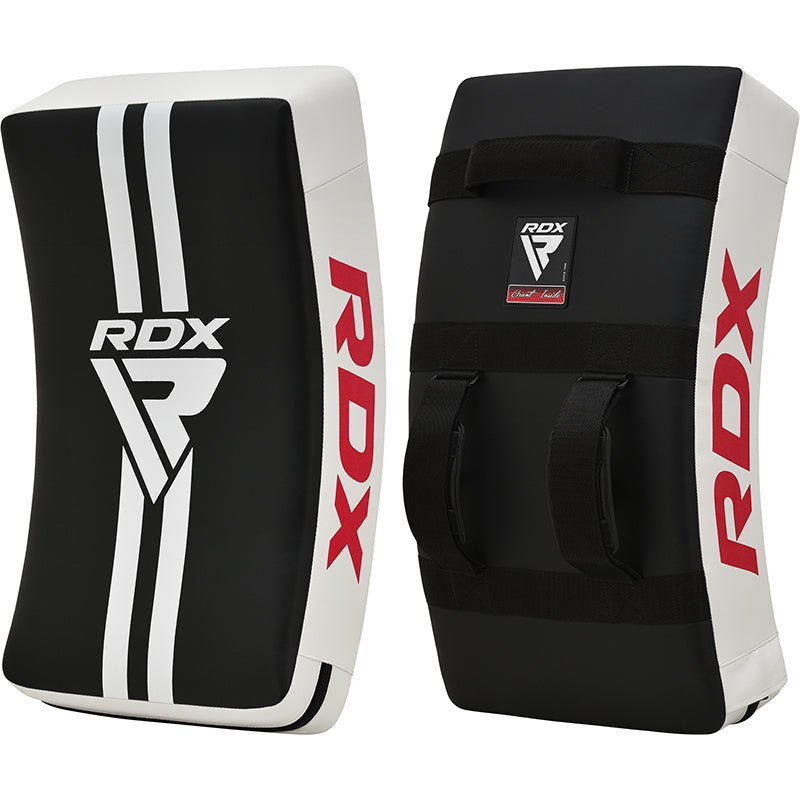
RDX Kicking Pad – MMA Kick Shield with Double Protection
RDX professional kick shield with gel and dual-absorption foam. Maximum durability, comfort, and grip for intense training.
kick shield
kicking pad MMA
RDX shield
kick shield boxing
MMA training equipment
RDX shock protector
Muay Thai training
kick puncher
Kicking Pad RDX – Double protection, maximum resistance.
Train with the power and safety you need thanks to this professional kick shield. Its design combines Shell Shock™ absorption gel and Supremo Shock Foam™ to offer double the protection and cushioning , protecting the trainer's hands and withstanding the hardest blows.
Made with ultra-resistant and durable Maya Hide™ synthetic leather , this kick shield withstands intensive use in MMA, Muay Thai, boxing and kickboxing training.
The reinforced nylon handles and straps ensure a firm and secure grip, while their curved, anatomical shape adapts perfectly to the body, offering comfort and control with every strike.
✅ Double gel + foam padding
✅ Durable and impact-resistant material
✅ Ergonomic curved design
✅ Non-slip grip with reinforced handles
✅ Ideal for MMA, boxing, Muay Thai and functional training
Sold individually. Official RDX training shield, designed to withstand the hardest hits.
RDX Kick Shield for MMA Training
RDX kicking pad with double gel and foam padding
Professional kick shield for boxing and Muay Thai
Would you like me to also provide you with an English version optimized for international SEO (US/UK) ? That way you could use it in the multilingual version of your store (Shopify Markets).
Perfect 👌 — here's the article in Spanish , optimized for SEO and designed to be integrated directly into your online store (for example, on the product page or on your Redglove / RDX Spain training blog).
The text combines attractive writing + natural keywords to rank on Google for searches such as kick shield , MMA kicking pad , Muay Thai training , RDX protector , etc.
If you're looking for a professional kick pad that can withstand the toughest training sessions, the RDX Kicking Pad is your best ally. Designed to offer double protection and superior cushioning , this pad combines Shell Shock™ Gel technology with Supremo Shock Foam™ to absorb the most powerful impacts without compromising the trainer's comfort.
Made from Maya Hide™ synthetic leather , an extremely durable and wear-resistant material, this kick shield withstands intense sessions of MMA, boxing, Muay Thai or kickboxing without losing its shape or performance.
The shield's curved, anatomical design fits the body perfectly, improving stability and providing an ideal surface for practicing front kicks, knee strikes, or circular punches.
Furthermore, its reinforced nylon handles and straps ensure a firm and secure grip, even during high-intensity workouts.
Dual protection: Gel Shell Shock™ and Supremo Shock Foam™ for maximum shock absorption.
Extreme resistance: High durability Maya Hide™ synthetic leather.
Ergonomic design: Anatomical curvature that improves comfort and control.
Secure grip: Nylon straps and handles for total control during training.
Professional use: Ideal for trainers, gyms and practitioners of MMA, Muay Thai, kickboxing and boxing.
Individual sale: 1 unit of training shield.
Coaches and athletes looking for a robust and comfortable kicking shield , with the quality guarantee of RDX Sports .
Perfect for sparring, technique and power sessions , this kicking pad allows you to develop precision, strength and speed with total safety.
RDX is a globally recognized brand in the field of contact sports , with state-of-the-art materials and professional quality finishes.
Each product is designed to maximize your performance and provide the protection you need in every workout.
Turn every stroke into an opportunity to improve your technique.
Train with the Kicking Pad RDX and feel the difference.


Free shipping from €60 in mainland Spain.
If you have any questions about any of our products, sizing, material, stock... please contact us by email info@redglove.es, WhatsApp or by calling our Customer Service number 640338682, we will be happy to help you.